
At a glance
- Role: Product owner and builder. I work in admissions at The Evergreen State College. I am not an engineer.
- Built with: Claude Code, Cloudflare Workers, plain HTML/CSS/JavaScript, and a Python script that builds the data.
- Status: The lookup is live. The yearly review workflow is built and tested locally, but it is not live yet. It is waiting on production setup.
- Link: cadr-crosswalk.wadetarave.workers.dev
- Started: September 16, 2026
The problem
CADR stands for College Academic Distribution Requirement. It is the 17-credit subject distribution Washington’s public four-year universities use to decide admission eligibility.
A counselor needs to know whether a specific class, as it appears on their school’s schedule, meets a CADR subject area. Does Biology 1 (Honors) count as lab science? Does Intro to Marketing count as anything?
The answer existed in 236 Excel workbooks, one per district. The data was authoritative. It was also useless in the middle of a conversation with a student.
Misunderstanding has a real cost. A student can miss eligibility they earned. A district can believe it met a requirement it did not. I wanted to cut the misunderstanding at the source.
What it does
You pick your school. You pick the class, using the name on your own schedule. You get a plain answer.
There are four screens:
- Find your school. Search by building, district, or short form like “Kelso HS.” Large districts force a building pick, because the data is tracked by building.
- Find your class. Fuzzy search over that school’s own course list. Some large high schools run past 250 courses.
- Lookup. Invisible. The app matches your class to a five-digit state course code. You never see the code.
- Result. Shows the answer.
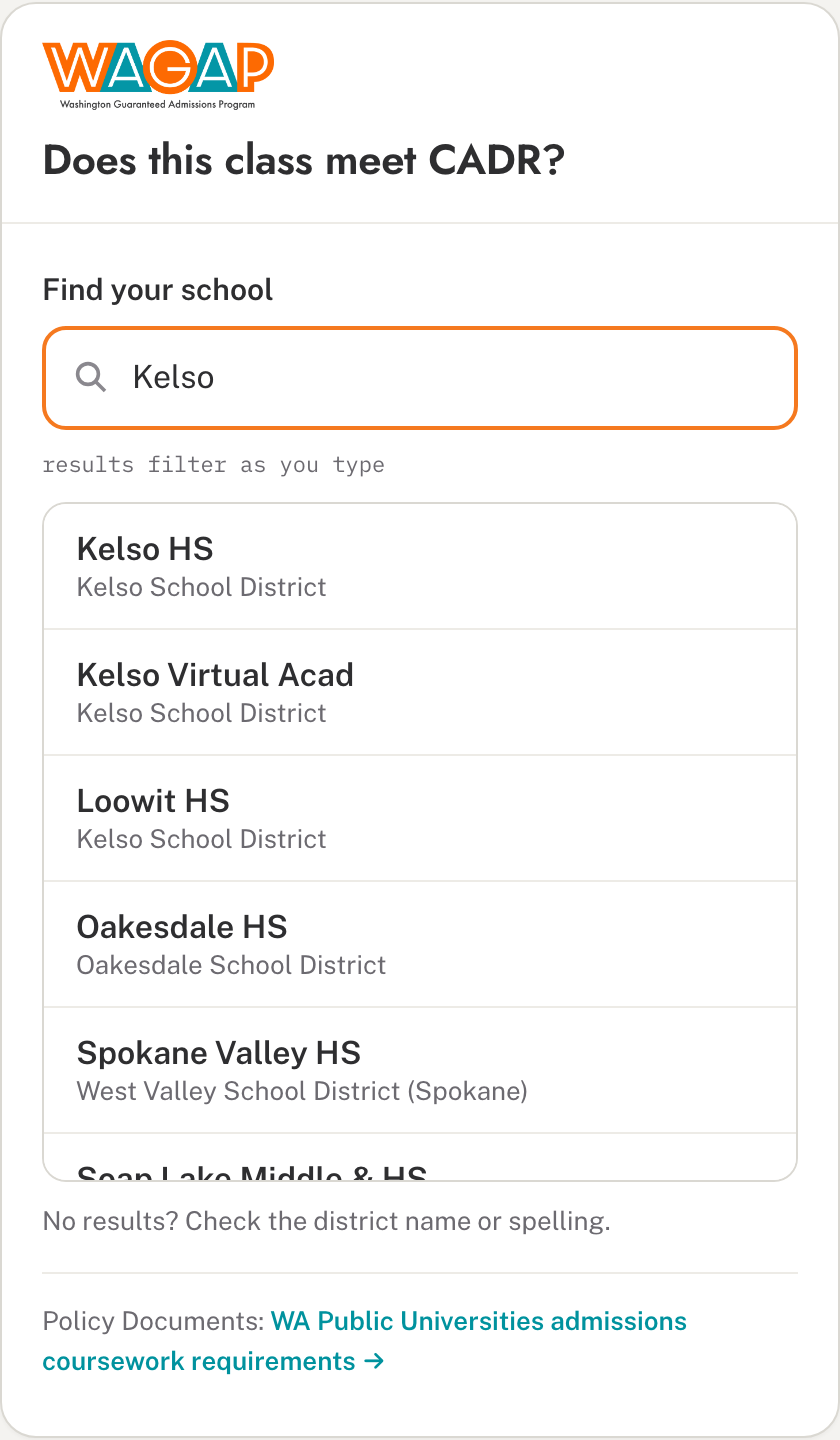
The four results:
- Meets CADR, with the subject areas named in plain words.
- Does not meet CADR.
- Flag mismatch. The district’s own system and the state data disagree. The tool shows both, side by side, in amber.
- Not applicable. The course has no recognized state code.
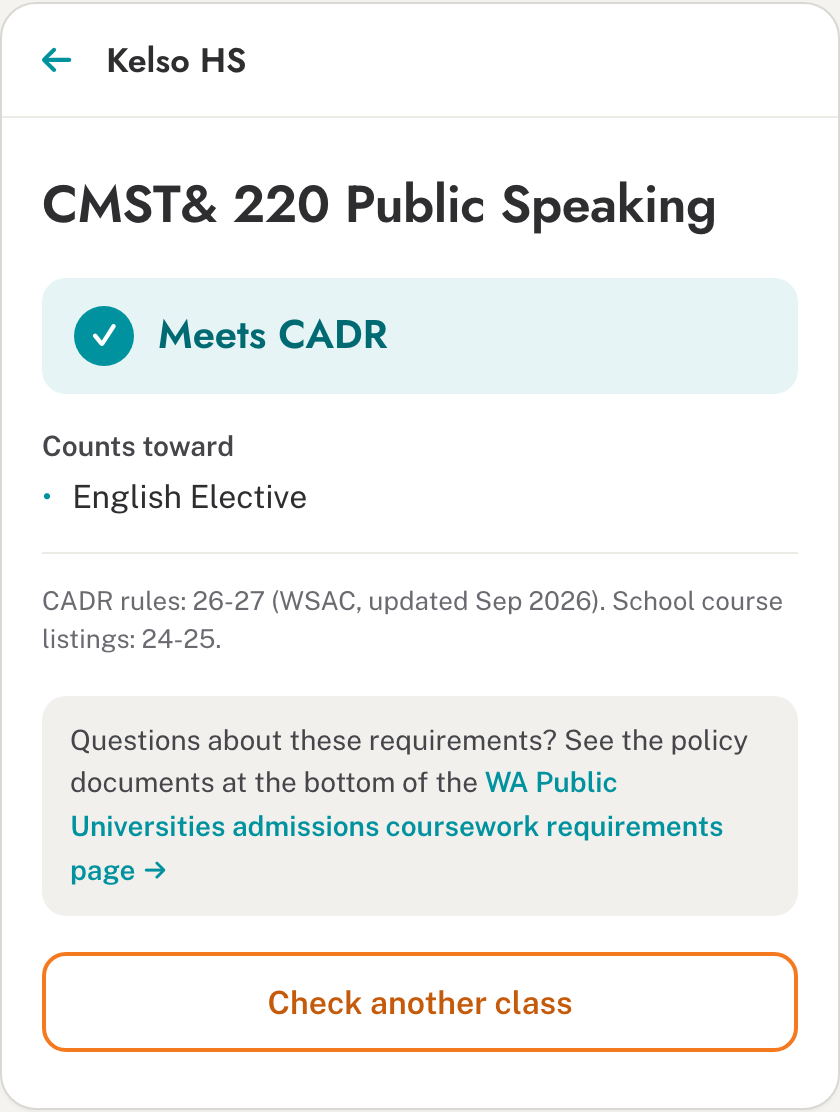
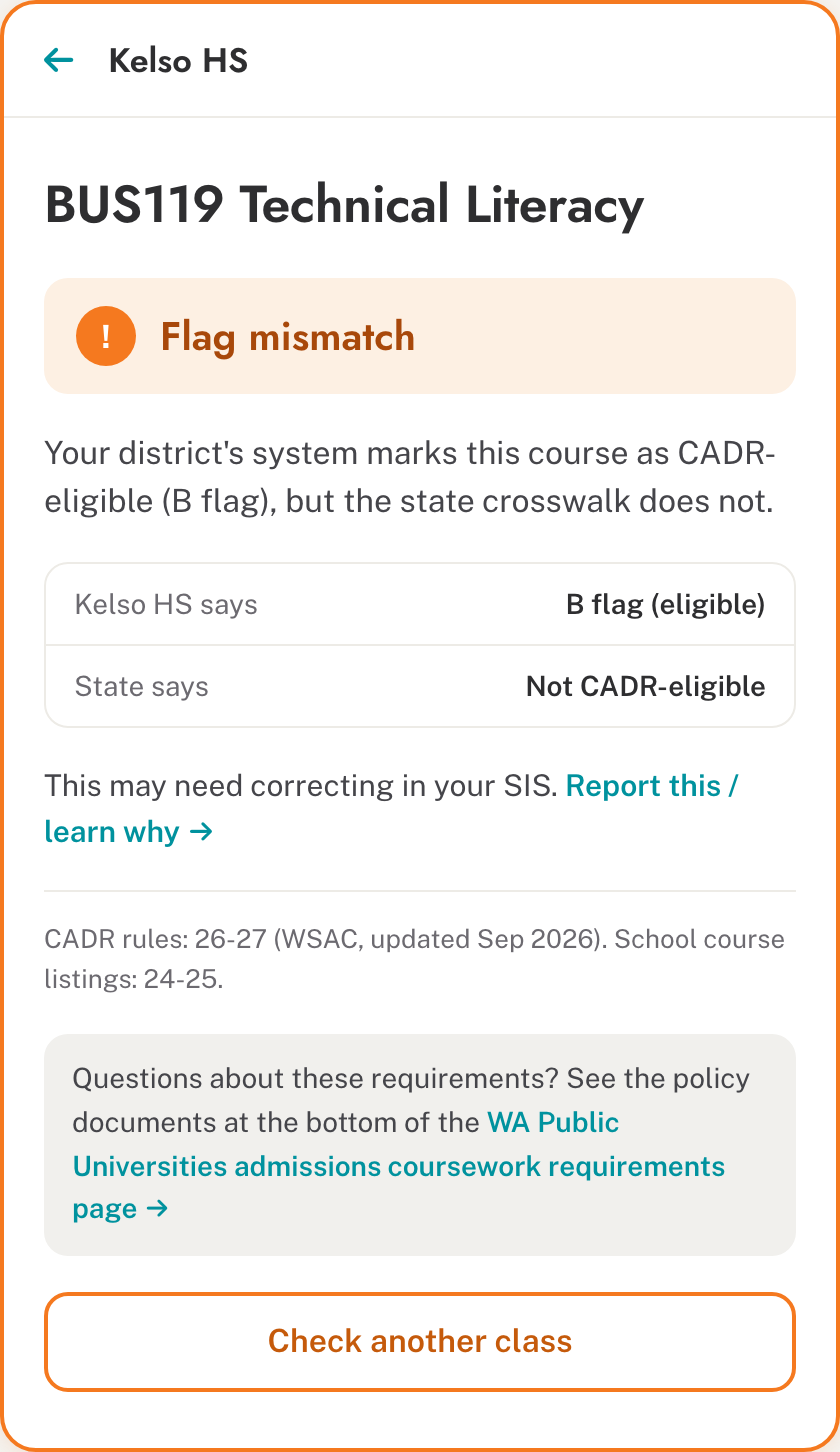
Every result carries a data-vintage line. The CADR rules are current for 26-27. The school course listings are from 24-25. Every screen links to the Washington public universities’ coursework policy. My goal was a correct answer in under 30 seconds with no training.
The scope
The numbers, from the build script:
- 501 school buildings
- 236 districts
- 164,193 courses
- 1,855 state course codes, with 12 CADR subject-area flags
A repeatable Python script reads the workbooks and joins each school’s courses to the state codes. When the source files change, I run it again.
How it got built
Day one: PRD to prototype. I started with a product requirements document. A design wireframe became a working prototype the same day. Then I swapped the sample data for the full statewide set.
The 47 MB problem. The full dataset as one file was 47 MB. That is too heavy for a counselor on a tablet. So I split it. An 85 KB index of schools loads instantly. Each school gets its own small file, fetched only when you pick it. The largest is about 470 KB.
The first deploy shipped too much. The deploy tool does not respect .gitignore. My first publish included files I never meant to make public. I caught it and moved the public app into its own folder, so only that folder ever ships. The lesson: check what actually got published, not just whether the page loads.
A quiet flaw in the old tool. The Excel tool treated an unrecognized state code the same as “does not meet CADR.” That is a confident answer nobody verified. The app says “not applicable” instead. 349 real courses statewide hit this. “Not found” and “no” are different answers, and a counselor deserves to know which one they got.
September 18: policy links. I added links to the official policy documents on every screen and relabeled a few things for clarity.
October 7: request a review. If a school thinks a course is coded wrong, or is missing, it can ask for a review. My first version used two stages, a screener and then a decider. Approvals went live immediately. Schools got an email at each step and a private status page.
November 15: the rework. I walked the admissions group through it. They asked for something I had not considered: one review a year, in November. Districts update catalogs in late winter and spring, so a yearly decision fits their calendar better than a rolling one.
I rebuilt around that. Requests close October 31. A light pre-check runs all year, with no approvals. In November a committee reviews in the app, and an Excel export serves as the meeting packet. Decisions are held until one publish click in early December, so every school hears at once. Anything unresolved rolls to next year, and the school is told.
I also added a one-command data refresh each September. It bakes in approved decisions and writes a change report I read before anything goes live.
The review workflow has 119 automated tests, and I ran a full cycle locally. It is built, not live. It still needs a custom domain, access controls for reviewers, and an email sending domain.
What I learned
The value is in the disagreement. The mismatch screen is the reason this tool exists. A smoother version would pick a winner and hide the conflict.
Listen to the people who will run it. The annual cycle did not come from me. It came from the admissions group, after they saw a working version. I would have shipped something that fit my idea of a workflow, not their calendar.
“Not found” is not “no.” One honest “not applicable” is worth more than a thousand confident wrong answers.
Check the published thing. A working page tells you little about what else went out with it.
I am still learning how to do this well. I did not write the code line by line. I described the problem, reviewed what Claude Code produced, tested the results, and caught mistakes like that first deploy. That was enough to get a useful tool built. It is not the same as engineering.
What’s next
Two things are not built: a shareable result a counselor can paste into an email, and a bulk check where you paste a full schedule and get every course at once.
The first real review cycle is likely November 2027, unless I decide to run a manual pass sooner. Before that, the production setup has to happen, and I need to name the people who will screen and decide.
If you work in a district and see a course coded wrong, the tool is live. Try your school.